In this digital era, monitoring personal assets is crucial for financial management. Today, I’ll share how to create a practical asset tracking web application by combining GitHub and Streamlit.
Why GitHub + Streamlit?
GitHub provides:
- Free and reliable data storage
- Version control
- Collaborative environment
Streamlit offers:
- Simple Python web development framework
- Rich data visualization tools
- Free cloud hosting
Project Architecture
The project consists of three main components:
- GitHub repository storing asset data in JSON format
- Python scripts for data processing
- Streamlit web interface for data visualization
Implementation Steps
1. GitHub Setup
First, we need to:
- Create a GitHub repository
- Generate a Personal Access Token
- Enable automated data read/write
2. Building the Streamlit App
Key code example:
import streamlit as st
import pandas as pd
import plotly.express as px
from datetime import datetime
import json
# Page configuration
st.set_page_config(page_title="Asset Tracking Dashboard", layout="wide")
# Data loading
@st.cache_data
def load_data():
 # Logic for reading data from GitHub
 …
# Main interface
def main():
 st.title("Asset Tracking Dashboard")

 # Data input section
 with st.sidebar:
 st.header("Add/Update Record")
 # Input form
 …
# Chart display section
 st.header("Asset Trends")
 # Using Plotly for visualization
 …
3. Deploying to Streamlit Cloud
Deployment steps:
- Sign up for Streamlit Cloud
- Connect GitHub account
- Select repository for deployment
- Set up environment variables (e.g., GitHub Token)
Features
1. Data Management
- Automatic GitHub synchronization
- Historical record tracking
- Secure data storage
2. Visualization
- Asset trend charts
- Daily profit statistics
- Overall return analysis
3. User Interface
- Clean input forms
- Real-time data updates
- Responsive design
Extension Ideas
- Add more asset categories
- Implement data backup mechanisms
- Include additional analysis metrics
- Add alert functionality
Results
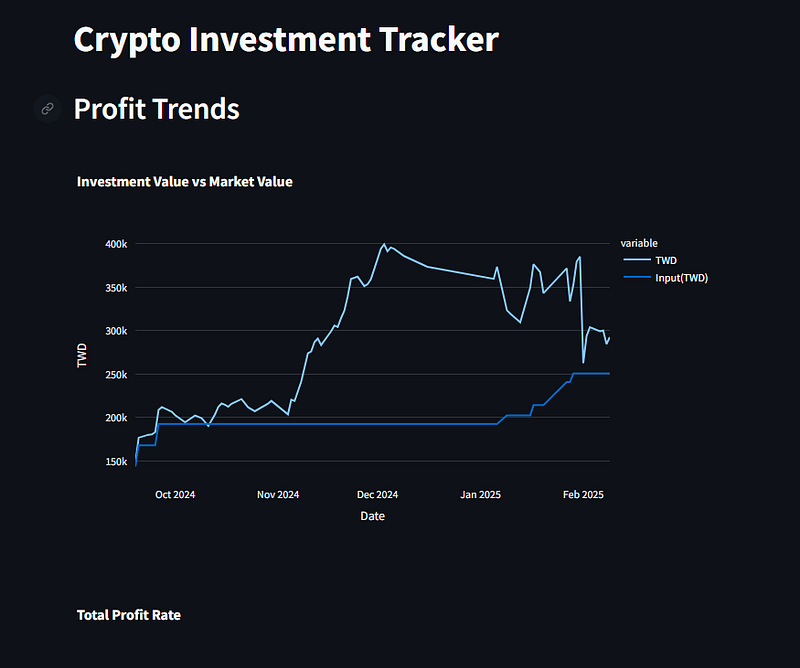 Profit tends.
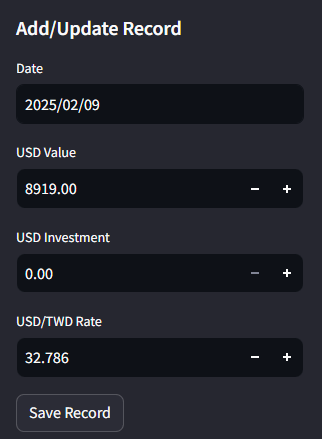 Add the Input add current value of the asset.
Conclusion
This project demonstrates how to quickly build a practical personal application using modern tools. By combining GitHub and Streamlit, we’ve not only solved the challenges of data storage and visualization but also created a scalable application architecture.
If you’re interested in this project, feel free to leave a comment below. I’m happy to share more details about the implementation or source code upon request.
Afterword
The purpose of this article is to help others understand how to use free tools to build their own asset tracking system. Technology shouldn’t be a barrier to financial management but rather a tool to help us make better decisions.
If you have similar project ideas or experiences, please share them in the comments section!